

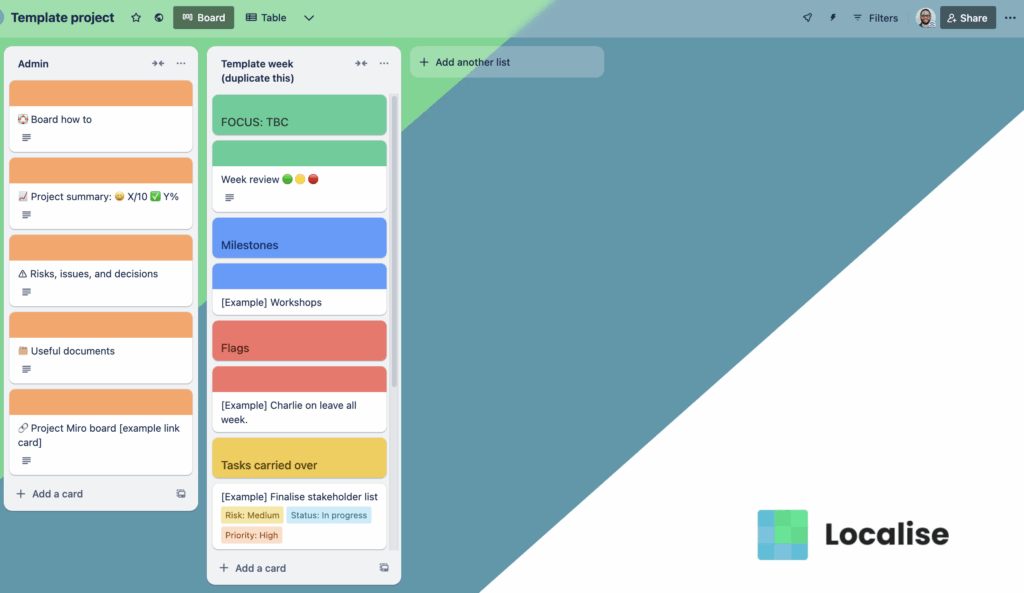
Trello has been around for years, but remains a really useful tool for organising. One of the things I really love about it is its focus on doing one thing really well – making lists. Yes, most people use it for managing projects, but they’ve managed to develop the product over time to not force users down that route – you can use it to collaboratively work on lists for pretty much any purpose.
Anyway, I digress. There’s loads of ways to use Trello for the purpose of managing a project. Some people like putting the cards into lists like To do, doing, done and so forth to operate like a kanban board. That works well in some cases, but I’ve found it easier a lot of the time to instead use a list per week, with the goals, tasks, and various bit of information relevant to that week in each list. Tasks can be carried forward if necessary, marked as complete and so on.
You can visit the board and make a copy of it. It includes a long how to guide – probably providing just how over-engineered this thing is! – as well as links to spreadsheet templates to store other information in.
I’d be interested to know if people find this useful and how they have improved it. Get in touch and let me know!
How the board works
The board is organised by week – so a list per week.
The exception to that is the Admin list which always sits on the far left. This contains useful information relating to the project in an easy to find place – such as links to useful folders and documents, or to Miro boards and so on. In the useful documents card, there is a link to a Google spreadsheet template of a log of risks, issues, and decisions, which you may find helpful. Create your own copy and then link to that in your card.
Make sure you keep the template list in place to the right of the Admin list. You can use this to create new week lists whenever you need them.
There is a card in Admin for a project summary – add a description of the project’s purpose and list the key outcomes in the format [outcome] – [confidence /10] – [progress %] – [target date] for easy reference. When these are updated, note the change in the comments for an auditable record. The title of this card should have an overall confidence (the smiley face) and progress (the green tick) score included in it. Again, log changes in the comments.
In the weekly lists, the green card sets the focus of the week. Under this heading, there is also a card for a weekly reflection by the team. This can be done during a meeting or asynchronously using the comments on the card at the end of the week. Give the title of this card a green, yellow, or red dot in the title depending on how it has gone.
The blue card can be used to specify any important milestones that week, which could be a delivery date or an important meeting. Use the red card to highlight any issues for that week – such as someone being on leave.
For cards under Focus, Milestones, or Flags headings, add a cover of the relevant colour to make it clear it is not a task card. Make it a half size cover, so the contents of the card are white, to differentiate from the heading cards.
If a project has different workstreams, use Trello labels to identify them. Explain them in a card in Admin if you feel it necessary.
Arrange cards under the heading cards – tasks carried over, scheduled tasks, and completed tasks.
Tasks cards don’t have covers.
Major tasks on a card, break them down into sub tasks using checklists.
Use custom fields to set the priority, status, and risk of each major task where appropriate.
When a week is over, ensure all cards are in the right place, then drag it to the end of the board and colour it green.